Frequently asked questions
1) We provide a Global Sim with worldwide coverage and an APAC Sim offering best value data packages for that region. Once you connect the Sim in the app, check your Sim type in the 'eSim/ Sim info' screen 2) Our Sims only works with unlocked phones 3) The Sim will automatically connect to a partner network and a registration is generally not needed 4) If you have multiple Sims/ eSims from us, it is important to know which one is actually used in your phone. To check the Sim ICCID number: - On iOS: Settings> General> About> look for the ICCID entry - On Android: Settings> About phone or About device> Status/ SIM status/ Phone identity> ICCID or SIM card number
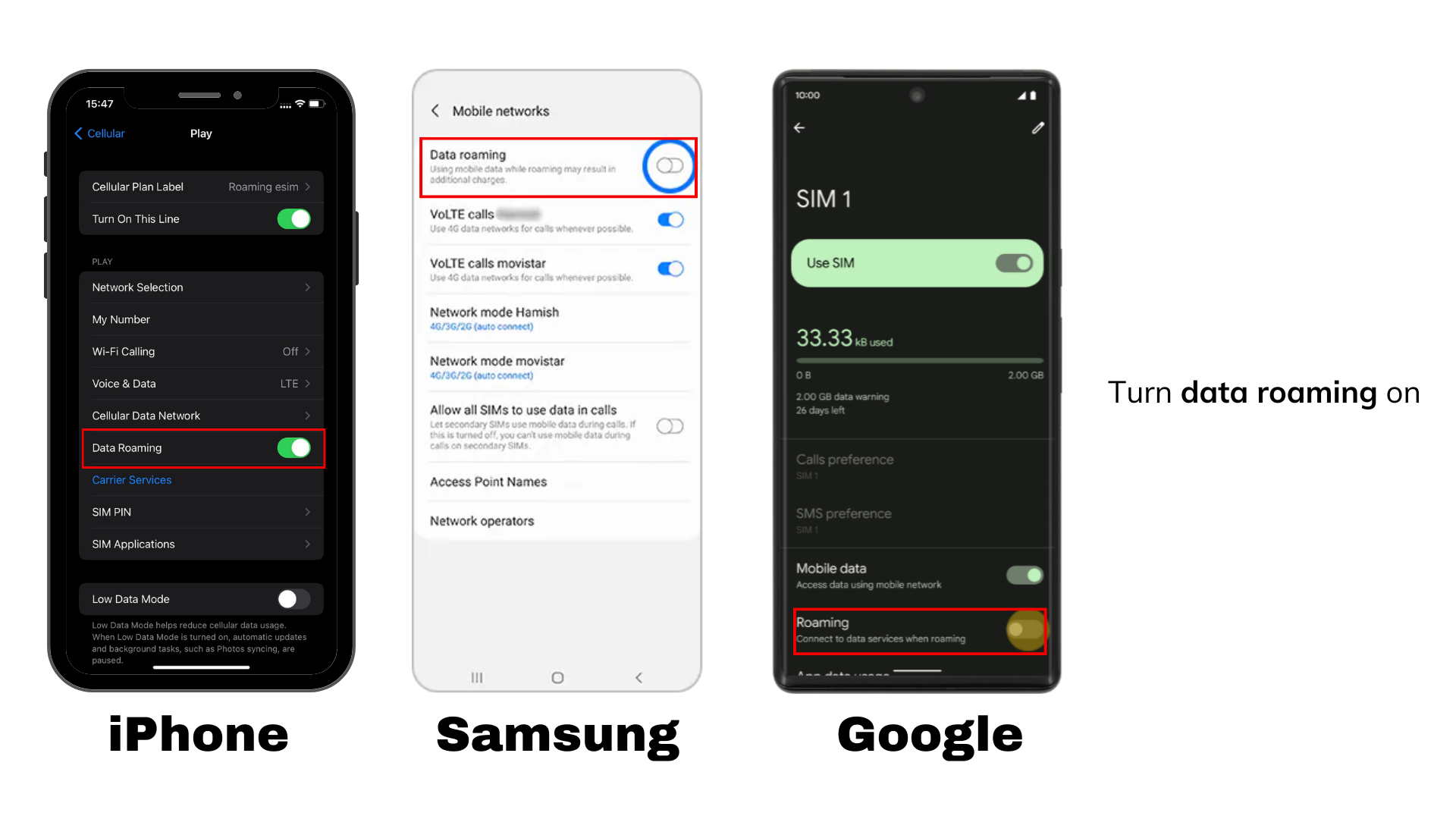
1) The ‘traditional’ Sim card comes in 3 sizes and shall work on all available phone models 2) Set up Sim card - Insert Sim into your mobile device - Ensure ‘Data’ and ‘Data Roaming’ are both switched on (iOS: Settings> Mobile data and Mobile data options; Android: Settings> Mobile networks)
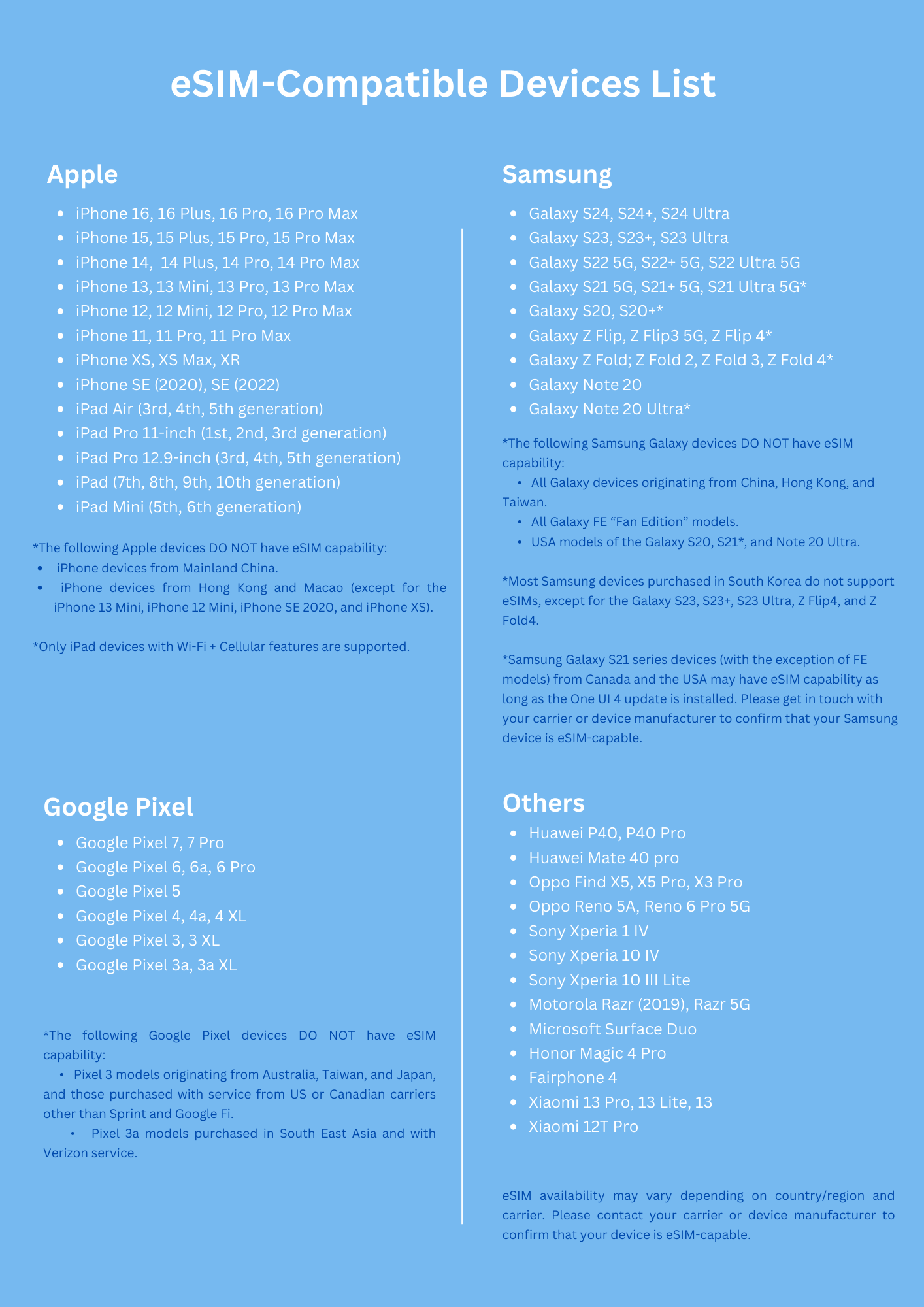
1) eSim stands for 'embedded Sim' and is a digital version of the commonly used Sim card. Once installed, the eSim stays on your phone unless removed, and can be activated anytime with a simple click 2) When buying a new eSim in our app or on our website, select the eSim option instead of physical Sim 3) Before you purchase an eSim, please check your mobile device is eSim-compatible and network unlocked. View full list of eSim-compatible and supported devices: Click here 4) Setup eSim: video demo - After purchase, you receive an email with the eSim QR code. Please also check the spam folder if you do not see the email - Follow instructions in email and scan the code to connect eSim to your phone - Ensure ‘Data’ and ‘Data Roaming’ are both switched on 5) Multiple eSims/ Sim: - You will still receive calls and sms on your main Sim even if you select our eSim/ Sim for data usage - Most devices allow up to 5 eSims, thus you could connect to both our Global and APAC eSim to get the best rates globally 6) Do not delete your eSim profile. It can only be scanned once and cannot be re-connected 7) If you change your phone, you need to purchase a new eSim and any remaining balance can unfortunately not be transferred
We have created a range of data options to cater to all traveller profiles and needs. 1) Global Credit: - 150+ countries - Valid 365 days - Deducted based on usage and country of data usage. See list Ideal for frequent global travelers with long-term usage and lower data requirements 2) Global/ Regional Packages: - 7-120 countries - Valid 3-365 days - Fixed amount of data in multiple countries Ideal for frequent travelers with moderate data needs. 3) Country Packages: - 1 country - Valid 1-30 days - Highest data amount - Some of these products offer local number and calls Ideal for individuals requiring a high data amount for a fixed period and location
1) Having the Sim in the phone and connected to the app are 2 different things. Please always be aware which Sim is used on your device and make sure it is the same Sim connected to the app. You can use the Sim independently without connecting it to the Xplori app. Similarly, connecting a Sim to the app does not automatically mean it is actually on your phone. Connecting the Sim with the Xplori app allows package tracking and top-ups 2) Upon purchasing your initial data package, the app should automatically link to your Sim number with the app so that you can see balance and packages. If you get an additional Sim, the app will ask you if you want to connect the new Sim. You will see all the Sims you have in the ‘eSim/ Sim info’ screen 3) To manually add a Sim number to your account, in the app go to Account> eSim/ sim info> Changed Sim? and enter the last 7 digits of your Sim number (on the back of the Physical Sim or in the eSim email). The new Sim number will be displayed under ‘Select Sim’. See instructional videos here
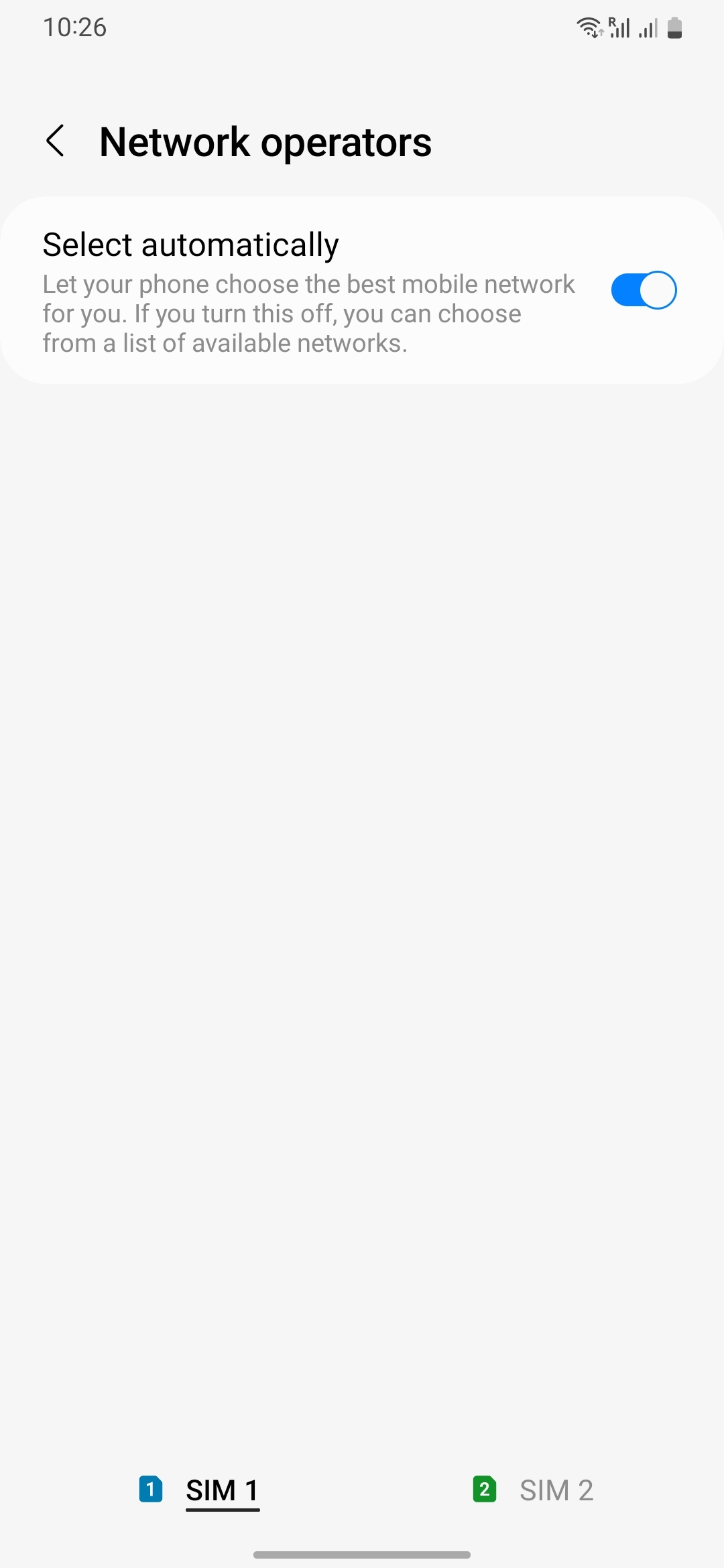
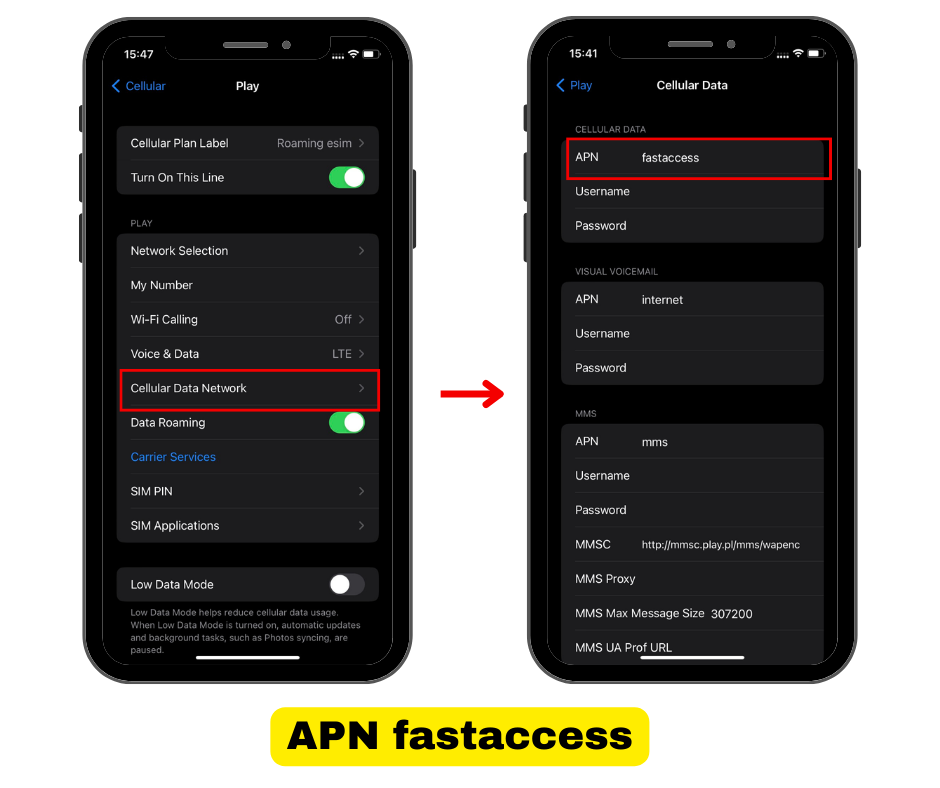
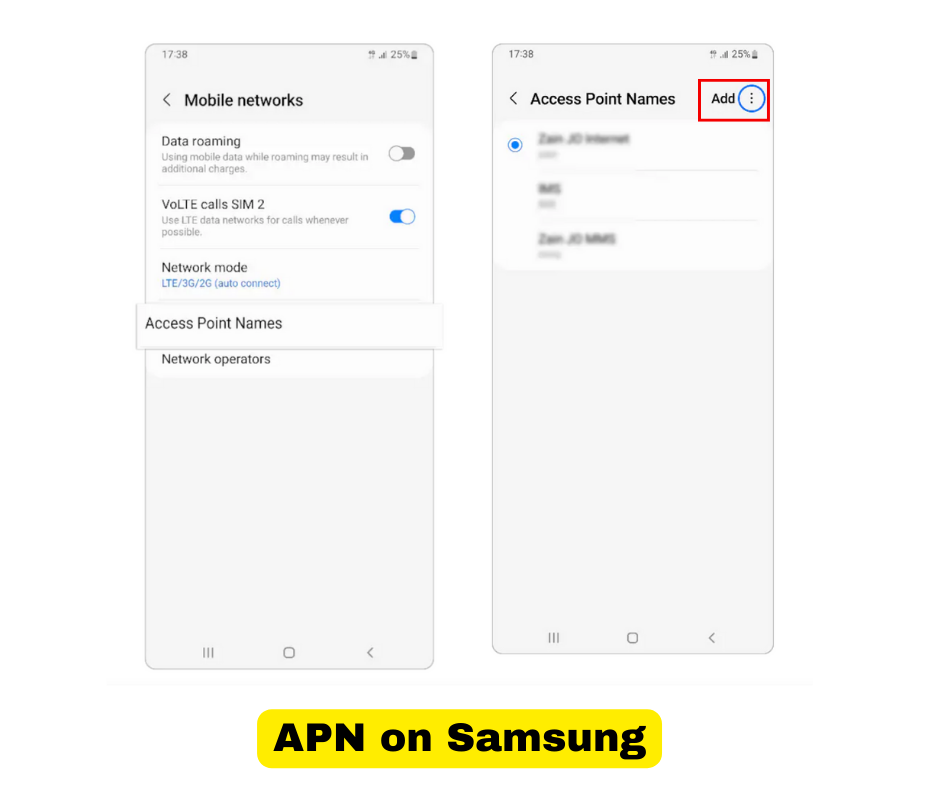
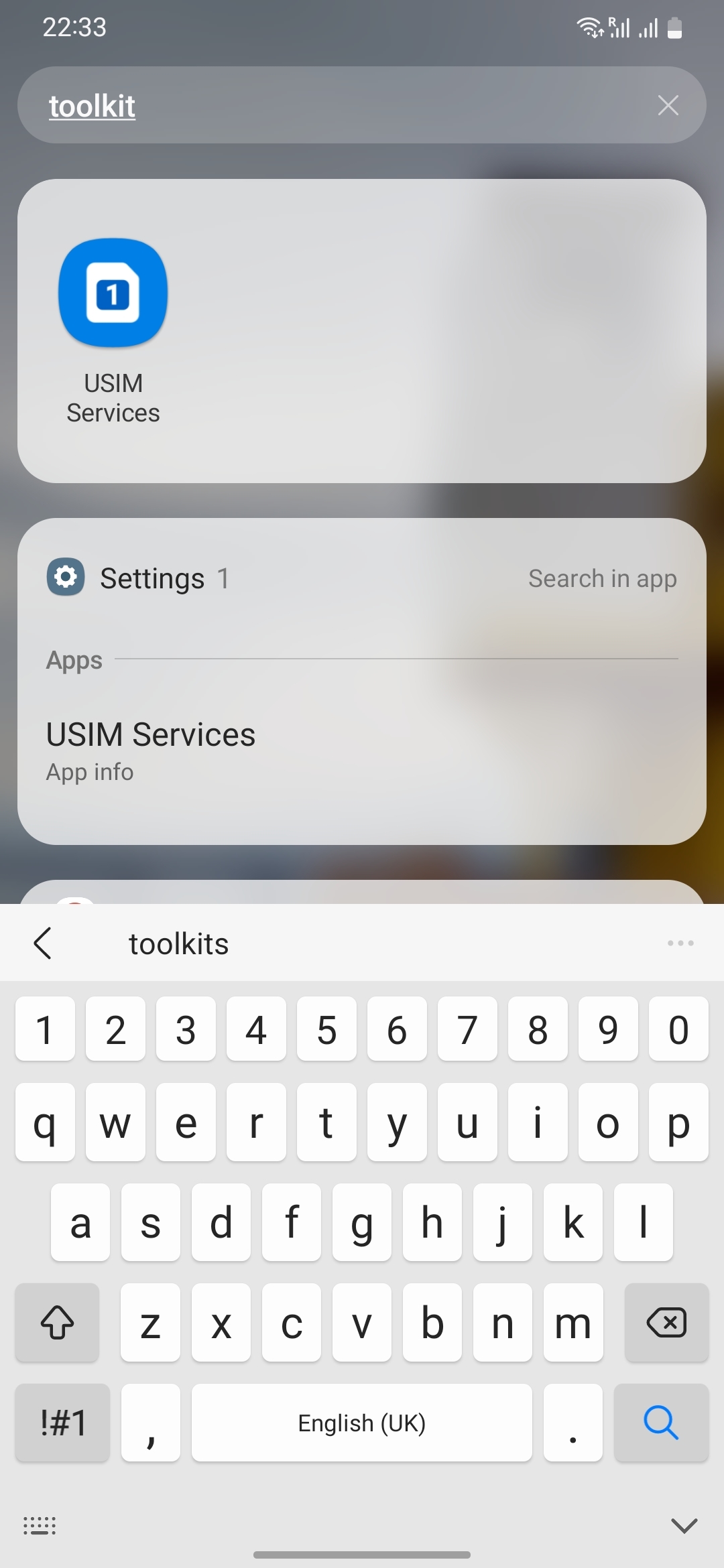
1) No network after inserting Sim - Please wait, Sim sometimes take several minutes to scan all networks - Check that Sim has been inserted correctly - Try at different location just in case it is a coverage issue - Switch off and leave phone for 5mins before turning back on. Make sure network search is on Automactic (iOS: Settings> Mobile network> Network Selection> Turn on ‘Automatic’ ; Android: Settings> Mobile networks> Network operators> Choose automatically) - Reset network (iOS: General> Reset> Reset Network Settings; Android: Backup& Reset> Network settings rese> Reset settings) 2) Mobile network, but no/ slow data connection - Check that ‘Data’ and ‘Data Roaming’ are both on - Make sure the eSim/ Sim is selected for data usage - Manually switch between 3G, 4G/ LTE and 5G auto (iOS: Settings> Mobile data> Voice& data; Android: Settings> Mobile networks> Preferred network type) - Switch off and leave phone for 5mins before turning back on. Make sure network search is on Automactic (iOS: Settings> Mobile network> Network Selection> Turn on ‘Automatic’; Android: Settings> Mobile networks> Network operators> Choose automatically) - Adjust APN settings for optimal connectivity (generally not necessary): Add the APN ‘fastaccess’ for Global eSim/ Sim, ‘3gnet’ or ‘mobile’ for APAC eSim/ Sim ( iOS: Setting> Mobile data> Mobile data options> Mobile data network> APN; Android: Setting> Mobile Networks> Access Point Network (APN)> Click on ‘+’ sign), - iPhone devices not showing APN settings shall go on this website to make the adjustments: http://www.unlockit.co.nz - Select Sim profile: on Android, please look for pre-installed Toolkit/ USim app, and on iOS please look for DMI in Settings (in Mobile Data or Sim Card). Then go to: USIM Services -> DMI -> Settings -> Profile -> 26006* 3) Cannot make calls - Check that your Sim type offers outgoing calls as many of our Sims do not offer this function - Make sure you have added country and regional code to the number (e.g. +49) - Try to call another number (e.g. hotel or friend) to test general functionality 4) Balance display/ PDP failure - If 'PDP authentication failure' is displayed, this most likely means your balance has been used up, please topup - If you feel that balance display might be incorrect, please go to 'Update/ Connect Sim' and insert your Sim number to reconnect Sim and app
1) Our standard Sim/ eSim do not come with a phone number. A US (Global Sim)/ Hong Kong (APAC Sim) number could be available for US$3/ month with 12-month commitment. Please message us if this is of interest. 2) Global Sim: If you have global credits, you can make outbound calls. Call rates vary depending on the country you are currently in, but is the same regardless of your call destination 3) Inbound calls are only available if you have requested a phone number for your Sim
1) Global credits only expire after 12 months. The validity extends with a new top-up. 2) Credits cannot be transferred between different Sim cards and eSims. Please make sure you use up the respective credits on the Sim card or eSim. 3) If you still have credits and purchase a data package, the package will be used first. You cannot use global credits to purchase data package since they are setup differently. 4) Packages start counting for the selected date. The default setting is the day of purchase, but you can click on the start date and change it. Please contact us if you need to change the package start date. 5) After purchase, the app will show your country package in the balance bar and in the Your Sim screen. You can follow the data used, but note that the number is rounded and not exact. Once expired, the package will no longer show in the app. 6) In case of very high usage in short period of time, the system will reduce the available speed to avoid unintentional draining of balance. This restriction can become permanent in case of repeated high usage. Please avoid long watching, gaming and wifi sharing.
1) If you order a Sim, we will send it by post to your address within 3 days. Budget another 2-7 days for delivery depending on your destination. For physical Sims, there is a small delivery charge added 2) eSim will be sent directly to your email. Please also check the spam folder if you do not see our email after 2 hours 3) Do contact us at listen@xplori.tech in case of any queries. We always reply messages, so please also check your email spam folder or forward the message in case you do not hear back 4) Your personal data is stored in line with international requirements on our secure cloud servers. If you wish to delete all your personal data, please click here
1) Can be made with Visa, Master or American Express cards 2) Are being processed and protected by Stripe, one of the largest payment processors in the world 3) Xplori does not store card details unless you choose to store the number for next time (but we never store related expiry date and CVV) 4) Small differences can occur on the data usage count due to rounding up by our partner networks. We cannot check those in details, but are happy to investigate if you feel the difference is sizable 5) Please note we cannot transfer your balance in case the Sim is lost, eSim has been deleted or you have a new device and require a new eSim 6) Refund is always offered if a technical issue cannot be resolved